Personalized shopping isn’t just a trend anymore. Customers today want products that reflect their identity, their story, and the moments that matter to them. That’s why more brands are offering Shopify customize product to create unique, interactive shopping experiences that stand out in a crowded market.
But easier said than done – creating a truly smooth and effective customized product experience is not always simple. In this guide, you’ll learn everything you need to know to build Shopify custom products with confidence.
What is Shopify Customize Product?
Shopify customize product is a type of product that allows customers to personalize or modify a product, making it an unique one. This can include adding names, choosing colors, uploading photos, selecting materials, or building a product step-by-step using a customization interface.
At its core, these features help turn standard items into unique, made-to-order creations. This not only enhances the shopping experience but also gives customers a sense of ownership and emotional connection to the product.
Here are some benefits of Shopify customizable products:
- Higher customer satisfaction and loyalty: Personalized products feel more meaningful to customers, leading to stronger emotional engagement. When shoppers help design their item, they’re more confident and happier with their purchase.
- Higher profit margins: Shoppers are willing to pay more for personalized or unique items. This allows stores to charge premium pricing and increase overall revenue per product.
- Stronger brand differentiation: Offering custom products helps your store stand out in competitive markets. Personalization creates a unique selling point that competitors without customization can’t easily replicate.
- Reduced return rates: Customized items are less likely to be returned because they reflect the customer’s personal input. Buyers know exactly what they are getting, especially when live previews are provided.
3 Types of Product Customization Shopify
There are many ways for stores to let customers personalize their products. Traditionally, Shopify already allowed shoppers to “customize” products by selecting variants such as size, color, or material. Over time, merchants have become more creative and flexible, offering deeper personalization that goes far beyond simple variant selection.
The level of customization now can depend on your product type, your production workflow, and how much creative freedom you want to give shoppers.
Here are 3 of the most popular customized product types:
1. Text-based customization
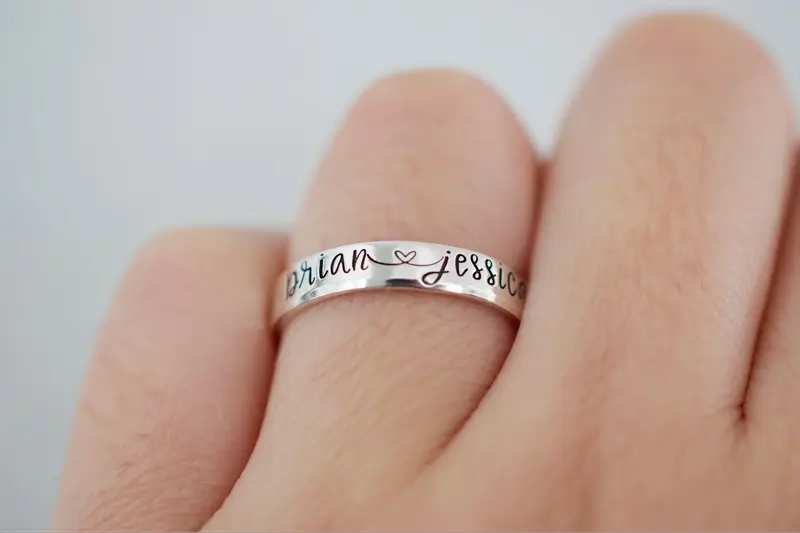
Text-based customization allows customers to add personalized text such as names, dates, initials, or short messages. It’s one of the simplest and most universal forms of personalization, commonly used for gifts and commemorative items.
Example: A jewelry store offering engraved rings where customers enter a name and select the engraving font.
You can offer text fields with optional controls like character limits, font choices, and color options. This keeps the process simple for customers while giving each Shopify customize product a unique personal touch.
2. Design-based customization
Design-based customization focuses on letting customers change how their personalized products on Shopify look. It can range from uploading photos to editing designs directly on a live preview.
Example: A custom merchandise store where customers upload their photos, adjust placement, and add decorative elements in a real-time preview of their product.
This type of customization provides shoppers with a high level of creativity, offering a “design-your-own” experience. Stores selling apparel, print-on-demand, home décor, personalized gifts, or pet accessories often rely on this method because it allows customers to control layout, visuals, and artistic elements.

3. Multi-step customization
A multi-step builder guides customers through several steps, each focusing on a single customization category. This breaks complex customization into manageable parts and helps users complete their choices with greater confidence.
You often use multi-step builders for items with many customizable components, such as furniture, bundles, accessories, or multi-part kits. It ensures customers complete all necessary steps in the correct order.
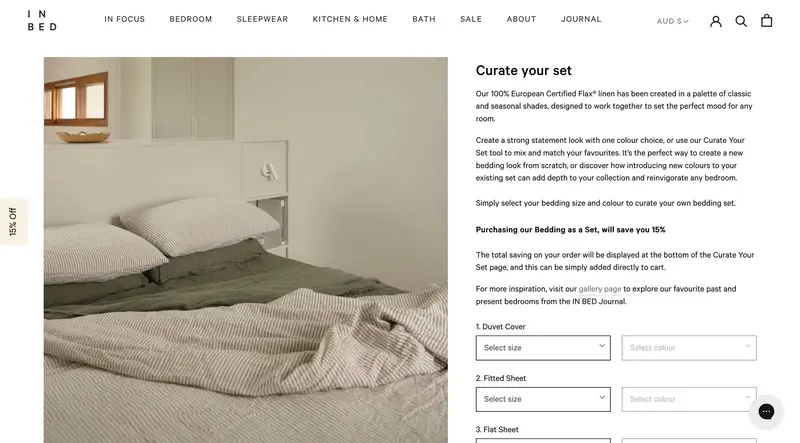
Example: A furniture shop letting customers customize their bedding set by selecting size, color, and design of each component: duvet cover, fitted sheet, flat sheet, etc.
How to Create Customizable Products in Shopify
Shopify allows you to build customizable products using a mix of built-in tools and third-party apps. Below is a practical, step-by-step guide on how to add personalization on Shopify:
- Step 1: Create a product & enable customization
- Step 2: Add advanced customization
- Step 3: Test Shopify custom product & optimize
- Step 4: Launch and fulfill your orders
Step 1: Create a product & enable customization
First, start by creating a new base product inside your Shopify admin. Log in to your Shopify admin and go to Products. Click Add product to open the new product setup.
Next, add the title, description, and images of this product. Make sure this information, especially the description, is detailed enough to help customers understand how they can personalize their product. Then, complete all the remaining information like pricing, inventory, shipping, etc.
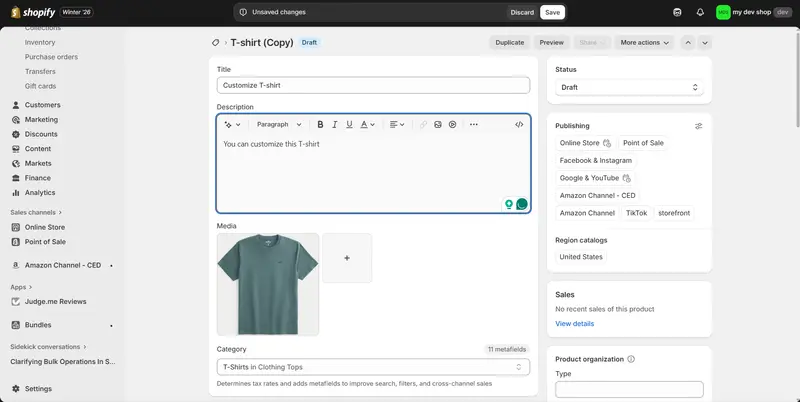
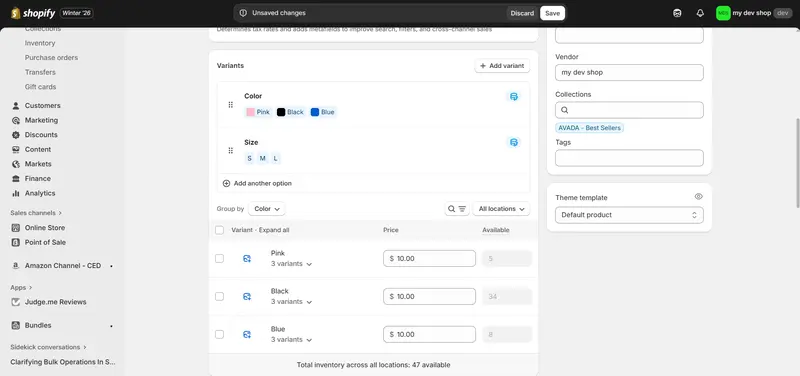
If your Shopify customize product only has simple choices like color or size, you may add these under Variants so customers can choose the option they prefer. Remember, Shopify only allows each product to have up to 3 variant options and 100 variants. Remember to add variant images, prices, inventory, or even variant metafield.
Read more: How to Bypass the Shopify 100 Variant Limit: A Complete Guide
If you want to collect basic personalization details such as names or short messages, you can enable simple customization fields such as text inputs or dropdowns. These may be added using Shopify’s line item properties or through your theme settings.
You may also use a tool like BulkFlow if you want to add products in bulk or update product information efficiently on Shopify before enabling customization.
Step 2: Add advanced customization
If the basic customization is not enough for you, you will need to use a third-party solution from the Shopify App Store. These apps allow you to add inputs such as text fields, image uploads, dropdowns, or interactive design tools for your customizable products Shopify.
You can find and install them by going to the Shopify App Store and searching for keywords like “product customizer” or “custom products.”
Popular options include: Customily, Teeinblue, Zepto Product Personalizer, PC – Custom Product Options, and CPB – Custom Product Builder. We will provide detailed reviews and comparisons of these apps later in this guide to help you choose.
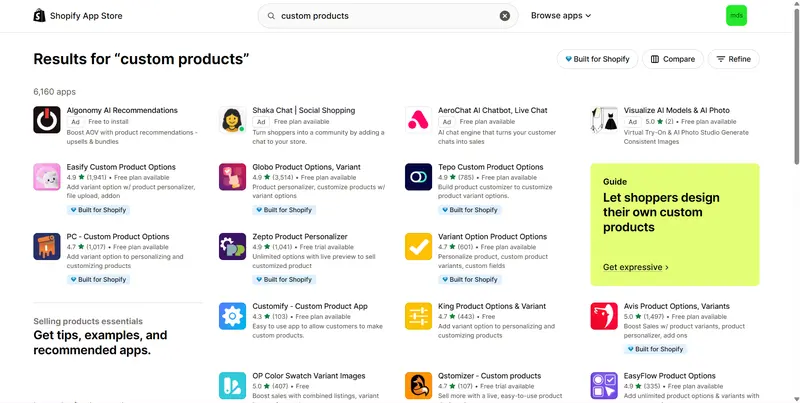
After installation, the next step is to adjust the app settings so you can start building your custom fields. The setup process may differ slightly from one app to another, but you can complete it easily by following the instructions provided by the app’s development team.
For example, here is how to add advanced customization if you use PC – Custom Product Options:
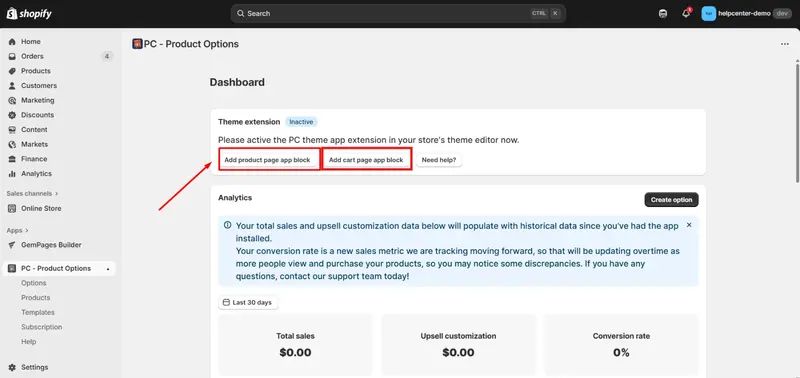
1. Once you installed PC – Product Product Options, go to the app and click Add product page app block and Add cart page app block. This will add a block for this app to your theme’s product page and cart page.
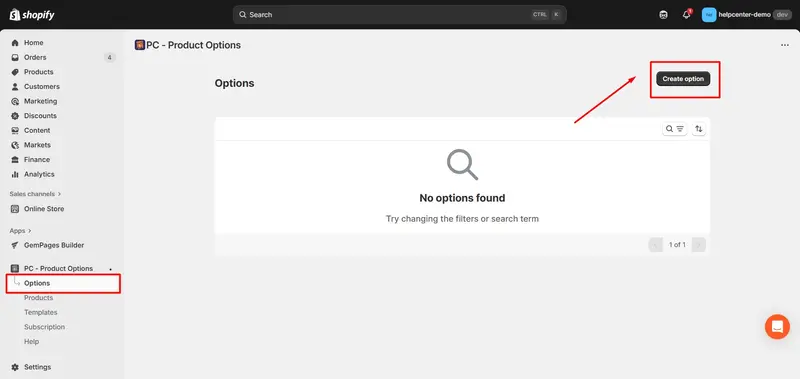
2. In the app dashboard, go to the Options tab and select Create option.
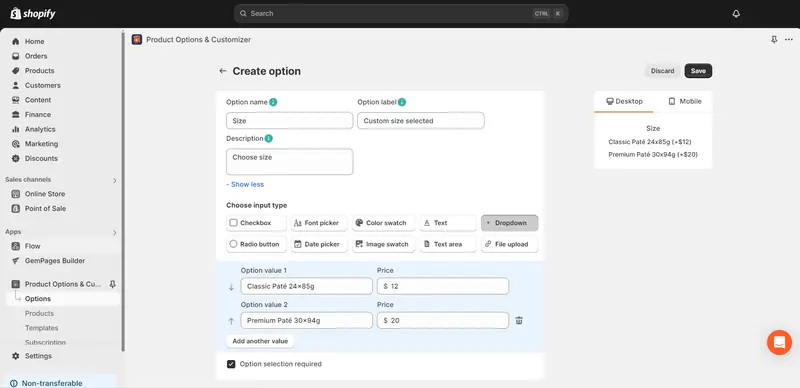
3. Enter the option details, such as the option name, label, description, and input type, then save your changes. Repeat the process with other options.
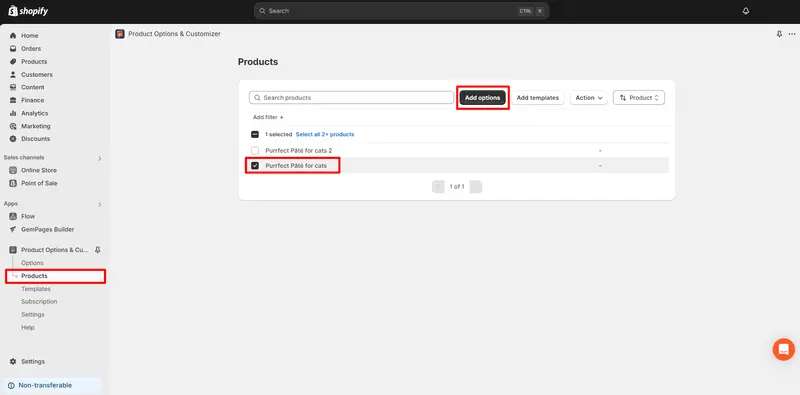
4. Navigate to the Products section, select the product you want to customize, and click Add options. Choose the option you want (in case you have more than 1).
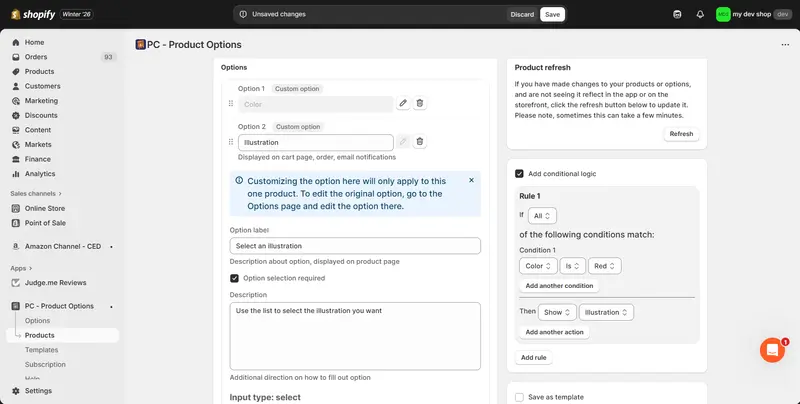
5. You can also create options for specific products. All the option details are similar, but here you can add conditional logic rules, which are useful for multi-step customization.
Step 3: Test Shopify custom product & optimize
Before launching, you should test the product from a customer’s perspective to make sure the shopping experience goes smoothly. Go through the entire process yourself – from selecting options to adding the product to the cart – to ensure all fields work properly.
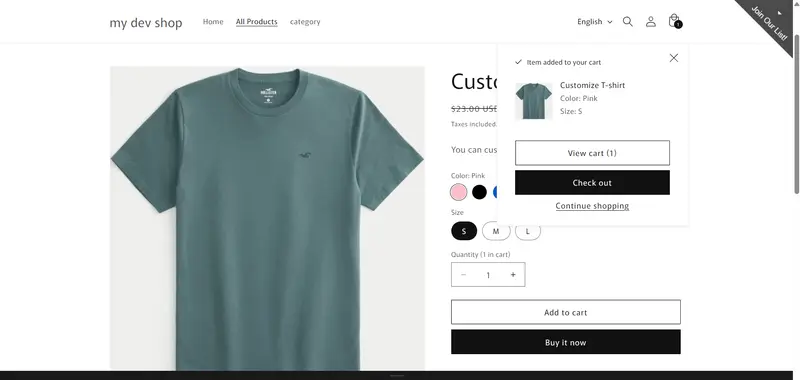
You should also verify that the preview updates in real time and accurately reflects the customer’s choices. This helps reduce confusion and improves buyer confidence.
Next, you can check how the personalization data appears in the cart and order details. This ensures your team receives all information needed to fulfill the order correctly.
You might also want to test the mobile experience. Many customers shop on mobile devices, so ensuring the interface loads quickly and remains easy to use may significantly increase conversions.
Step 4: Launch and fulfill your orders
Once your custom product is ready, you can publish it to your storefront.
As orders come in, you should review each one carefully to ensure all personalization details – such as text fields or uploaded images – are captured correctly. Customized orders require accuracy because they cannot be resold.
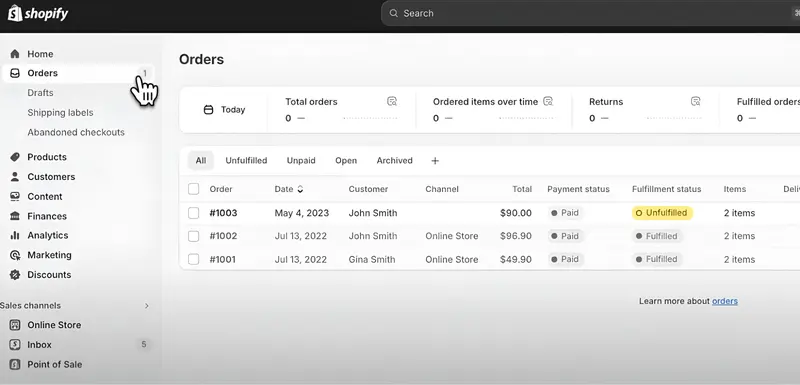
You may also check Shopify’s payment, checkout, and shipping settings under Shopify admin > Settings to make sure your workflow is organized and efficient. Automation tools like BulkFlow can further streamline the process by exporting order data and custom fields cleanly for your production team.
Shopify Personalized Products Examples to Inspire You
When you start building your own Shopify customize product, it can be incredibly helpful to see how real Shopify stores are doing it successfully. These examples will show you how different brands use customization to stand out.
1. Gifts.com
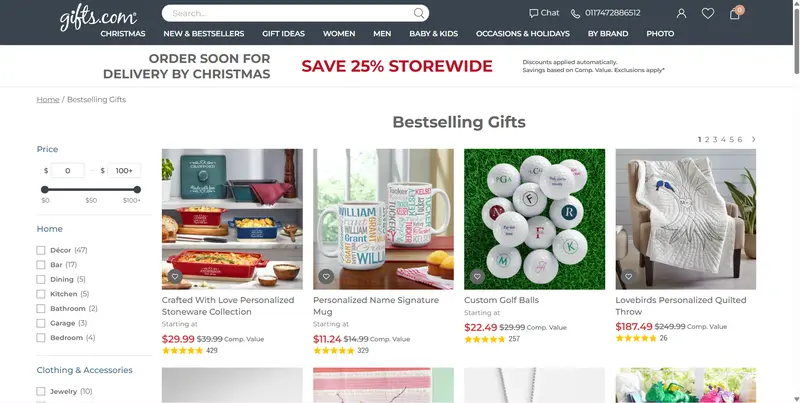
Gifts.com offers a huge selection of personalized items – everything from mugs and jewelry to home décor and baby gifts. Their product pages make the customization process easy to follow, and many items even provide live previews so shoppers can see changes in real time.
One of the strongest aspects of their experience is how simple the personalization flow feels. The steps are clear, the interface is intuitive, and the instructions are friendly, which helps customers feel confident about creating a gift. It’s a great reminder that reducing friction at every stage can make product customization Shopify feel exciting rather than overwhelming.
2. The Night Sky
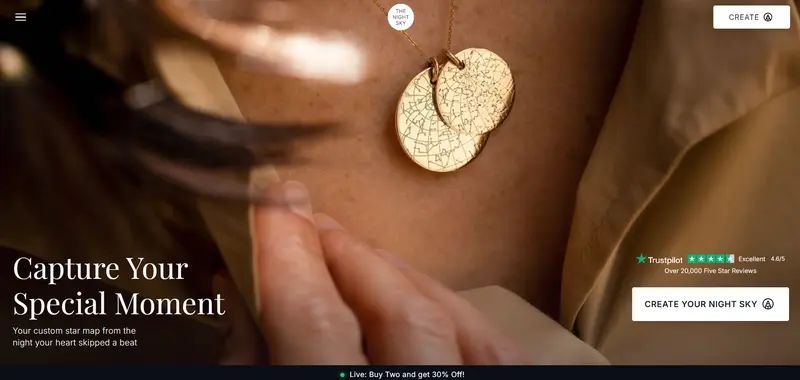
The Night Sky offers custom star maps based on a specific date, time, and location chosen by the customer. Customers simply enter the moment they want to capture – such as a birthday, proposal, or anniversary – and the site generates a unique constellation map for that exact time.
This is a powerful example of data-driven personalization. Customers feel emotionally connected to the product because it represents a real moment in their lives. The store builds its branding around memories, making it a standout model for turning niche data into meaningful designs.
3. Lollipopins
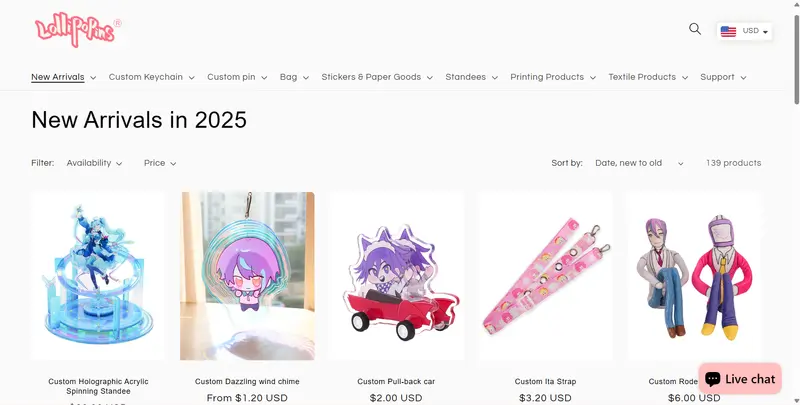
Lollipopins is a custom merchandise brand that offers a wide variety of accessories and promotional products you can personalize, from keychains and pins to bags, stickers, and textile items. All these items can be tailored to your design, logo, or artwork.
They use customization by letting customers choose the exact style, material, and design details for each product, so you can create something that reflects your aesthetic. Through custom options, people can turn their ideas into physical products that stand out or serve as meaningful gifts, branded merchandise, or keepsakes.
5 Most Popular Apps for Adding Shopify Customize Product
Shopify’s default features can usually only support basic customization, such as variants or simple metafields, so adding advanced customization features is often best done with an app. These tools offer everything from text inputs to live design previews, image uploads, step-by-step builders, and more.
Here are five of the most popular and effective apps for Shopify product customization:
#1: Customily Product Personalizer
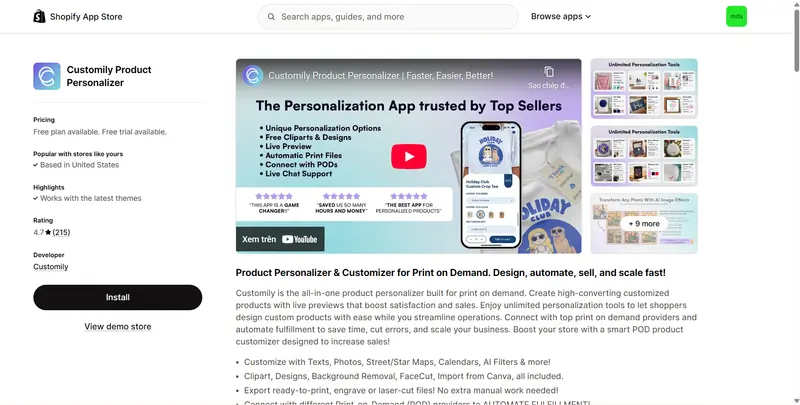
Customily is a powerful real-time product personalization tool that lets customers create their own designs using text, images, artwork, and draggable elements. It’s built for merchants who want an advanced design studio on their Shopify store.
Key Features:
- Supports personalization with text, photos, maps, calendars, AI tools, etc.
- Includes built-in clipart, templates, background removal, FaceCut, and Canva import.
- Automatically exports print-ready, engraving-ready, and laser-cut files.
- Integrates with multiple Print-on-demand providers to automate fulfillment.
- Provides global support with live chat assistance.
Pros:
- Highly flexible and ideal for advanced design customization.
- Live previews help increase customer confidence and reduce returns.
- Suitable for apparel, gifts, décor, and print-on-demand.
Cons:
- Setup may feel overwhelming for beginners.
- Complex designs require time to fully configure.
Pricing: Include Free plan; $49/month for paid plan (9-day free trial).
Key Takeaway: Perfect for stores that need a full-featured, professional-level customization studio.
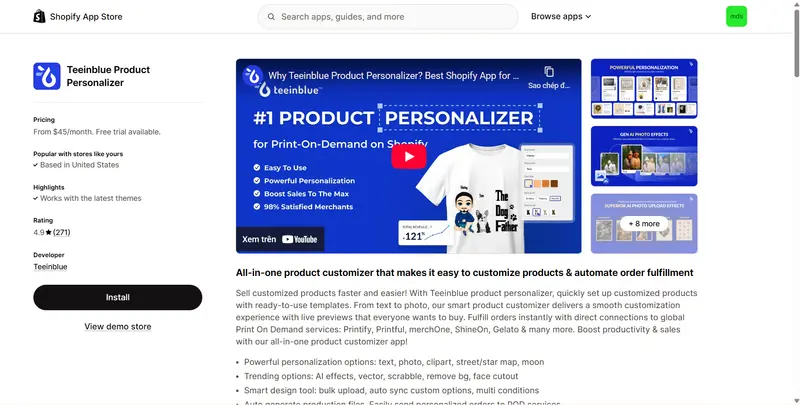
#2: Teeinblue Product Personalizer
Teeinblue lets you sell customized products faster with ready-to-use templates and a smart product personalizer that offers smooth, live previews for shoppers. It also streamlines fulfillment by connecting directly to leading global print-on-demand services, helping you boost productivity and sales.
Key Features:
- Supports personalization with text, photos, clipart, street/star maps, and moon phases.
- Popular tools: AI effects, vector, scrabble, background removal, and face cutouts.
- Offers smart design features such as bulk uploads, auto-sync, and conditional logic.
- Auto-generates production files and integrates with print-on-demand services.
- Comes with ready-made mockups and design resources for fast setup.
Pros:
- Very beginner-friendly with a clean dashboard
- Excellent choice for POD-focused stores
- Responsive customer support
Cons:
- High price
- Not ideal for complex multi-step customization
Pricing: Start from $45/month (14-day free trials).
Key Takeaway: A well-balanced, affordable solution for print-on-demand customization.
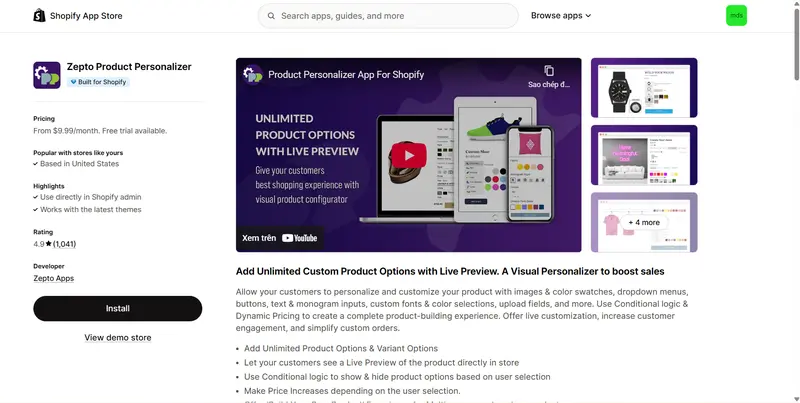
#3: Zepto Product Personalizer
Zepto is a simple yet effective customization app that enablé live product personalization, allowing customers to customize products using images, colors, text, fonts, and interactive input options. It also supports conditional logic and dynamic pricing to create a seamless, engaging, and fully customized product-building experience.
Key Features:
- Support unlimited product and variant options.
- Displays a live preview of customers’ selections directly on the product page.
- Uses conditional logic to show or hide options based on customer choices.
- Supports dynamic price adjustments depending on selected options.
- Enables “build-your-own” experiences for multi-component custom products.
Pros:
- User-friendly for both merchants and customers
- Budget-friendly without sacrificing essential features
- Suitable for many product types
Cons:
- Not as feature-rich as more advanced design apps
- Limited layered customization options
Pricing: Starts around $9.99/month (15-day free trial).
Key Takeaway: Ideal for merchants who want simple visual customization at a low cost.
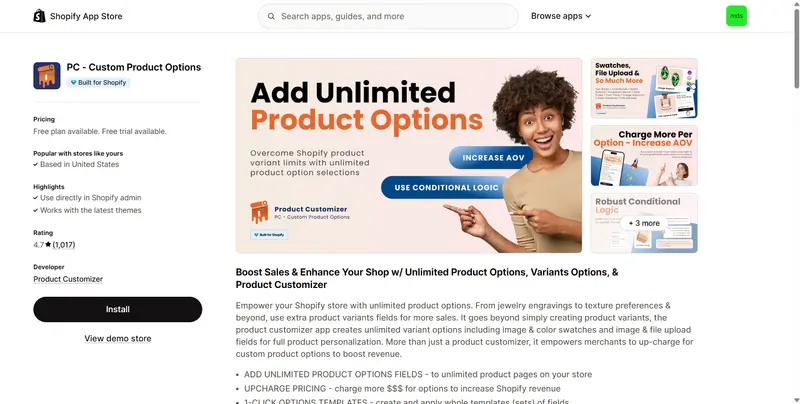
#4: PC ‑ Custom Product Options
PC – Custom Product Options enable unlimited product options and advanced customization, including image and color swatches, file uploads, and personalized fields beyond standard Shopify variants. It also allows merchants to add paid custom options, helping increase sales and revenue through product personalization.
Key Features:
- Adds unlimited custom option fields to products across your Shopify store.
- Supports option-based price upcharges to help increase average order value.
- Uses one-click option templates to quickly apply sets of fields to products.
- Advanced field types: file uploads, color swatches, and image selections.
- Includes conditional logic to show/hide options based on customer choices.
Pros:
- Very easy to set up for simple or service-based customization
- Affordable with strong functionality
- Great for forms, monograms, engraving instructions, or product variations
Cons:
- No real-time visual preview
- Not suitable for customers who want to design directly on the product
Pricing: Free plan available; paid plans start from $8.9/month (14-day free trial).
Key Takeaway: Best for structured, form-based customization rather than visual design.
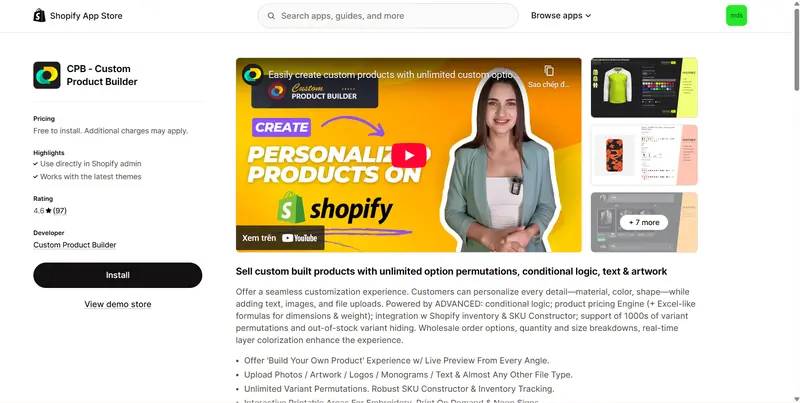
#5: CPB ‑ Custom Product Builder
Custom Product Builder is a robust configurator designed for stores selling products with multiple customizable parts. It supports step-by-step customization, layered visuals, and conditional rules.
Key Features:
- Enables a “build-your-own product” experience with live previews from multiple angles.
- Allows customers to upload photos, artwork, logos, monograms, text, and various file types.
- Supports unlimited variant combinations with advanced SKU building and inventory tracking.
- Provides interactive printable areas for embroidery, print-on-demand, and neon products.
- Offers deep customization through CSS/JS and API access for external system integrations.
Pros:
- Great for complex customization with many components
- Highly visual and engaging for customers
- Flexible enough for everything from shoes to furniture
Cons:
- Higher pricing than simpler apps
- Setup can be time-consuming for large product catalogs
Pricing: Free to install, charge per custom product (30-day free trial)
Key Takeaway: Ideal for advanced product configurators with multiple layers and steps.
How to Sell Customized Products on Shopify: 5 Tips
Selling personalized products requires more than adding customization fields; you also need to make the buying experience clear, simple, and trustworthy.
Below are five practical tips to help you increase conversions and deliver a smooth customization journey for your Shopify custom product store:
- Clear and realistic visuals: Customers rely heavily on visuals when buying personalized items, so clear images can make a significant difference. You may consider showing sample images or realistic previews to help customers feel confident before ordering.
- Keep the experience simple: While customization is exciting, too many options can overwhelm shoppers. You could streamline the process by offering only the most important choices, arranging steps logically, and using clear labels.
- Build trust and social proof: Shopify customize product that often carry emotional or meaningful value, so buyers need assurance they’re making the right decision. Displaying customer photos, testimonials, and real examples may help establish credibility.
- Streamline order fulfillment: Customized products require careful handling, so your backend process should be organized and efficient. A smooth workflow helps prevent delays and improve customer satisfaction.
Shopify Customize Product – FAQ
What are the pros and cons of product customization?
Product customization helps you stand out, increase customer engagement, and charge higher prices because shoppers feel more connected to personalized products. However, it can also add complexity to your production workflow and increase fulfillment time. You may need extra tools, clearer instructions, and quality checks to avoid errors.
How to add custom options on Shopify without using third-party apps?
Shopify allows you to add basic custom fields by using line item properties. You can enable this through the theme editor or by adding small code snippets to your product template. This method works for simple inputs like text boxes, but doesn’t support previews or advanced features.
Can I let customers see a preview of their Shopify custom product?
Yes, but Shopify does not provide live previews by default. To offer real-time image or design previews, you would need a personalization app like Customily, Teeinblue, or Zepto. These apps generate live visual updates so customers can see their final design before purchasing.
Conclusion
Shopify customize product is about creating meaningful, interactive experiences that allow customers to shape a product in a way that feels unique to them. It helps brands stand out, increase perceived value, and encourage stronger customer loyalty.
What comes next is continuous improvement. As customer expectations evolve, you can keep refining your customization flows, experimenting with new design tools, and staying aligned with emerging trends such as AI-assisted design, real-time previews, and more flexible production workflows.
Alongside customization, managing your standard product catalog efficiently is just as important. BulkFlow helps you handle regular products with ease by streamlining bulk imports, updates, and exports. This keeps your store organized, saves time, and allows your team to focus on enhancing the overall customer experience.